
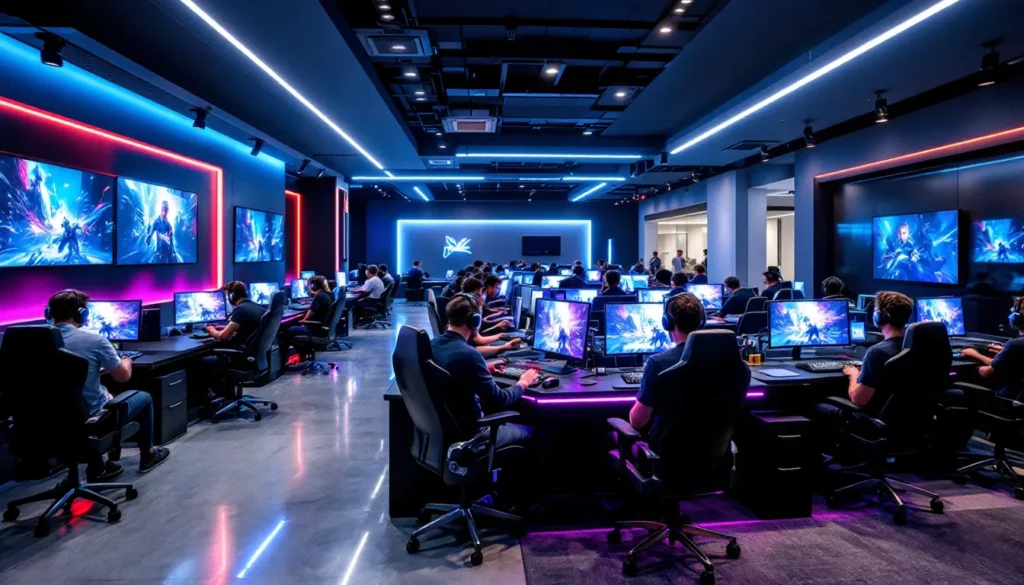
Searching for a gaming lounge near you isn’t just about finding a place with some PCs and consoles anymore. In 2026, local gaming spaces have evolved into specialized hubs offering everything from RTX 4090-powered rigs to dedicated VR zones and esports training facilities. Whether you’re a competitive player looking for a low-latency setup to climb ranked ladders, a casual gamer wanting to try the latest AAA titles without the hardware investment, or someone who just wants to game alongside other enthusiasts, the right gaming lounge can completely change your experience.
The challenge? Not all gaming lounges are created equal. Some are glorified internet cafes with outdated hardware, while others are legitimate esports venues with equipment that rivals professional setups. This guide walks through everything you need to know to find a quality gaming lounge in your area, from search strategies and must-have features to what you should expect during your first visit. Let’s get into it.
Key Takeaways
- A gaming lounge near you offers access to high-end gaming equipment like RTX 4090 rigs, VR zones, and esports facilities without the $2,000+ hardware investment required for a personal setup.
- When searching for a gaming lounge, use Google Maps, check local gaming Discord servers and Reddit communities, and read reviews that mention specific hardware specs and equipment maintenance to identify quality venues.
- The best gaming lounges feature RTX 4070+ GPUs, 144Hz+ monitors, wired ethernet connections, ergonomic seating, and game libraries that match your interests, with clear pricing and transparent policies.
- Gaming lounges provide three major advantages over home gaming: access to premium equipment, direct social connection with local gaming communities, and regular tournament and event opportunities.
- Before committing to a gaming lounge, ask about current GPU/CPU specs, personal account access, network ping times, hardware upgrade schedules, and any hidden fees beyond hourly or membership rates.
- Maximize your first visit by going during off-peak weekday hours, testing multiple stations, joining the lounge’s Discord community, and respecting the shared space to build positive relationships with staff and other players.
What Is a Gaming Lounge and Why Are They Becoming Popular?
A gaming lounge is a physical venue where gamers pay to access high-end gaming equipment, play with others in a social environment, and participate in events or tournaments. Think of it as a modern evolution of the LAN cafe, but with significantly better hardware, more diverse gaming options, and an emphasis on community building.
These spaces typically offer gaming PCs, consoles (PS5, Xbox Series X, Nintendo Switch), VR setups, and sometimes even retro gaming stations. Most charge by the hour or offer membership packages that reduce the per-session cost. The rise in popularity stems from several converging factors: gaming hardware costs have skyrocketed (a proper gaming rig in 2026 can easily run $2,000+), more people want social gaming experiences beyond Discord calls, and the esports boom has created demand for practice spaces with tournament-grade equipment.
Gaming lounges also serve as third spaces for gamers, neutral ground where players can meet, form teams, and build local communities. For younger gamers without disposable income for a personal setup or adults living in smaller apartments without room for a dedicated gaming station, lounges fill a genuine need. The pandemic accelerated this trend as people craved in-person social interaction around shared interests, and in 2026, that momentum hasn’t slowed down.
How to Find the Best Gaming Lounges in Your Area
Using Google Maps and Local Search Tools
Start with the obvious: Google Maps. Search “gaming lounge near me” or “PC gaming cafe” and check the results within a 5-10 mile radius. Pay attention to the following:
- Recent activity: Check when the business was last updated and if there are recent photos from customers. Abandoned listings or outdated info are red flags.
- Operating hours: Gaming lounges with limited hours (like only weekends) might indicate a side operation with less investment in equipment.
- Location type: Is it in a commercial plaza, a standalone building, or tucked in a strip mall? This can hint at the space size and atmosphere.
Google’s local search algorithm prioritizes well-maintained business profiles, so lounges that appear at the top with complete information and regular updates are usually more established. Don’t ignore Yelp and Apple Maps either, cross-reference results to catch places that might not rank as high on one platform.
Checking Gaming Communities and Social Media Groups
Local gaming communities often know about lounges before they even rank on Google. Check:
- Discord servers: Many cities have local gaming Discord servers where members share info about LAN centers, tournaments, and meetups.
- Subreddits: City-specific subreddits (like r/BostonGaming or r/LAGaming) frequently have threads about local gaming spots.
- Facebook groups: Search for “[Your City] Gaming” or “[Your City] Esports” groups. Members usually post reviews and experiences.
- Twitter/X and Instagram: Search hashtags like #[YourCity]Gaming or check geotags at gaming venues.
Social media gives you the unfiltered perspective. You’ll see actual gameplay clips, event announcements, and sometimes complaints about issues like lag or broken equipment before you waste time visiting.
Reading Reviews and Getting Recommendations
Reviews matter, but read them critically. Look for patterns rather than isolated complaints:
- Hardware mentions: Reviews that discuss specific GPUs, monitor refresh rates, or peripherals signal that the reviewer knows what they’re talking about.
- Cleanliness and maintenance: Multiple mentions of sticky keyboards, dirty stations, or broken equipment are dealbreakers.
- Staff knowledge: Do reviewers mention helpful staff who can troubleshoot issues or recommend games?
- Pricing clarity: Complaints about hidden fees or confusing pricing structures are common red flags.
Ask for recommendations in gaming communities you’re already part of. Fellow gamers will usually give you honest takes on which lounges are worth your time and money. If you’re into competitive gaming, ask specifically about setups, things like monitor input lag and network stability become critical when you’re trying to perform at your best.
Key Features to Look for in a Quality Gaming Lounge
Hardware and Gaming Setup Quality
The core of any gaming lounge is its hardware. Here’s what separates top-tier spots from mediocre ones:
- GPU specs: Look for RTX 4070 or better for PC setups. Anything below RTX 3060 in 2026 is outdated for current AAA titles at high settings.
- Monitors: 144Hz minimum for competitive gaming, 1440p resolution preferred. Some premium lounges offer 240Hz or even 360Hz displays for esports titles.
- Peripherals: Quality mechanical keyboards (Cherry MX or equivalent switches), gaming mice with adjustable DPI, and comfortable headsets with clear audio. Membrane keyboards and generic mice are unacceptable.
- Network infrastructure: Wired ethernet connections (not WiFi), low-latency routing, and sufficient bandwidth to handle a full house without lag spikes.
- Console setup: For console areas, expect PS5 and Xbox Series X with 4K HDR displays. Bonus points for fighting game setups with low-latency monitors and arcade sticks.
Ask about their upgrade cycle. Lounges that refresh hardware every 2-3 years show they’re invested in quality. Places running 5-year-old gear are cutting corners.
Game Library and Platform Availability
Hardware means nothing if the game selection is limited. Quality lounges offer:
- PC game libraries: Steam accounts with popular multiplayer titles (Valorant, CS2, League of Legends, Dota 2), current AAA games, and indie hits. Some use services like Xbox Game Pass for PC.
- Console libraries: Physical and digital collections covering major releases. For esports lounge setups, expect dedicated stations for fighting games like Street Fighter 6 or Tekken 8.
- BYOG policies: Can you bring your own games or log into your personal accounts? This matters for players who want to use their own progress and purchases.
- Update management: Games should be patched to current versions. Nothing kills the vibe like waiting 20 minutes for a multi-GB update.
Check if they support the genres you care about. A lounge focused on competitive FPS titles might have a weak selection of RPGs or single-player experiences, and vice versa. According to gaming setup guides on How-To Geek, platform compatibility and game library depth are among the most cited factors affecting user satisfaction.
Atmosphere, Comfort, and Amenities
You’ll be sitting here for hours, so comfort isn’t optional:
- Seating: Ergonomic gaming chairs or quality office chairs. Cheap racing-style chairs that fall apart after six months are a warning sign.
- Lighting: Adjustable lighting or at least dimmed ambient lighting. Harsh fluorescent overhead lights create eye strain during long sessions.
- Temperature control: Gaming PCs generate heat, and packed lounges get warm fast. Good HVAC is essential.
- Noise levels: Some separation between loud social areas and focused gaming zones is ideal. Open layouts can get chaotic during peak hours.
- Food and drink policies: Can you bring your own, or do they sell refreshments? Some lounges partner with nearby restaurants for delivery.
- Restroom cleanliness: Basic but critical. If the bathrooms are neglected, the gaming stations probably are too.
The best lounges feel like a hybrid between a coffee shop and a gaming setup at home, comfortable enough to settle in but designed for performance.
Pricing Models and Membership Options
Pricing structures vary widely:
- Hourly rates: Typically $5-$12 per hour depending on the setup tier (basic PC vs. premium rig).
- Day passes: $30-$50 for unlimited play during operating hours.
- Monthly memberships: $50-$150 for unlimited or heavily discounted access, plus perks like priority reservations or private lockers.
- Event fees: Tournaments or special events might have separate entry fees on top of regular rates.
Do the math based on how often you’ll visit. If you’re going 3+ times per week, memberships almost always save money. Watch for hidden costs like equipment rental fees (headsets, controllers) or reservation charges for peak times. Transparent pricing posted clearly on their website or at the front desk indicates a well-run operation.
Different Types of Gaming Lounges You Might Encounter
PC Gaming Cafes and LAN Centers
The most common type. These focus on rows of gaming PCs, usually tiered by hardware quality (budget, mid-range, premium). LAN centers emphasize multiplayer gaming with friends, you can book adjacent stations and play together in the same room. Great for games like CS2, Valorant, or co-op titles where communication and coordination matter.
Expect densely packed stations, competitive energy, and a focus on esports titles. Some host weekly tournaments with prize pools. The culture here leans toward serious gamers who know their stuff, not usually beginner-friendly unless staff make an effort to welcome newcomers.
Console Gaming Lounges
Less common than PC cafes but growing in popularity, especially in areas with younger demographics. These feature PS5s, Xbox Series X consoles, and Nintendo Switches with large displays or projectors. Often more casual and social than PC-focused spots.
You’ll find fighting game communities here, with setups optimized for low input lag and compatibility with arcade sticks. Couch co-op games like Mario Kart, Smash Bros, or party games are staples. Pricing is usually similar to PC lounges but may include controller rental fees.
VR Gaming Arcades
Dedicated VR spaces are still niche but offer experiences most people can’t replicate at home. They provide headsets (Meta Quest 3, PlayStation VR2, Valve Index), motion tracking setups, and curated libraries of VR games and experiences.
VR arcades charge higher rates ($20-$40 per hour) due to equipment costs and the space required for safe play areas. Sessions are usually shorter, VR fatigue is real. These are best for trying VR before committing to home hardware or experiencing games that need large play spaces (like full-body VR rhythm games or multiplayer arena shooters).
Hybrid and Esports Training Facilities
The premium tier. These combine PC gaming, consoles, VR, and dedicated esports training areas. Some partner with semi-pro or collegiate esports teams to offer coaching, scrimmage spaces, and tournament hosting. Features on sites like Game Rant often highlight how esports lounge environments are designed specifically to replicate tournament conditions.
Equipment here matches or exceeds what you’d find at major esports events: 360Hz monitors, pro-grade peripherals, soundproof booths for team practice, and coaching staff who analyze gameplay. Pricing reflects the quality, expect memberships starting at $100+ monthly. These aren’t for casual drop-ins: they cater to players treating gaming seriously, whether for competitive advancement or content creation.
What to Expect During Your First Visit to a Gaming Lounge
Walking into a gaming lounge for the first time can feel intimidating, but the process is straightforward. You’ll check in at the front desk, where staff will explain pricing and setup. Most require some form of ID, and you’ll either pay upfront or start a timer tied to your station number.
Staff should walk you through the station setup: how to log in, where to find games, and any house rules (no food at stations, headset use required for voice chat, etc.). Don’t hesitate to ask questions, good lounges train staff to help new visitors get comfortable.
Once you’re at your station, take a minute to adjust your setup. Tweak chair height, monitor angle, and test peripherals before diving into a game. Most lounges let you customize in-game settings and save profiles if you’re a regular. If something’s broken or not working right (sticky keys, unresponsive mouse), report it immediately. Quality lounges will move you to another station without hassle.
The social dynamic varies by location. Some lounges are quiet and focused: others are loud and collaborative with people chatting across stations. Read the room and respect the vibe. If you’re there for competitive play, you’ll blend right in. If you’re more casual, stick to off-peak hours (weekday afternoons) when it’s less crowded and intense.
First-timers often underestimate how fast time passes. Set a phone reminder if you’re on an hourly rate, it’s easy to burn through $40 when you’re deep into a ranked session. Most lounges have clocks or timers visible, but not all stations display your remaining time clearly.
Top Benefits of Gaming at a Lounge vs. Gaming at Home
Access to High-End Gaming Equipment
The most obvious advantage: gaming on hardware you can’t afford or don’t have space for. A PC with an RTX 4090, 32GB RAM, and a 240Hz monitor costs upwards of $3,000, not counting peripherals. For $10-15 per session, you get access to that level of performance without the upfront investment or ongoing maintenance.
This extends beyond PCs. VR setups, high-end racing sim rigs with force feedback wheels, or fighting game cabinets with authentic arcade controls are experiences most home setups can’t match. You’re also not stuck with your hardware. If a new GPU drops or a monitor upgrade becomes standard, lounges refresh their equipment while you’d be stuck with whatever you bought two years ago.
Social Connection and Community Building
Gaming at home is solitary by default. Even with voice chat, you’re still physically alone. Lounges put you in a room with other gamers, people who get excited about the same clutch plays, frustrating bugs, or meta shifts you care about.
You’ll meet players at your skill level, find teammates for ranked queues, or just make friends who share your gaming interests. Some of the best gaming friendships form over shared sessions at local lounges, not through random online matchmaking. For competitive players, having a regular crew to scrim with locally is invaluable.
Lounges also host community events: movie nights for game releases, viewing parties for major esports tournaments, or themed gaming nights. These create a sense of belonging that online-only gaming rarely replicates. Features in publications like NME have documented how local gaming communities thrive when they have physical spaces to gather.
Tournament and Event Opportunities
Most quality lounges run regular tournaments, weekly, monthly, or tied to specific game releases. These range from casual bracket competitions with small prize pools to semi-serious qualifiers for larger regional events. Participating is a low-pressure way to test your skills in a competitive setting without the stress of major online tournaments where you’re just a username.
Events also include game launches, developer meet-and-greets, or partnership promotions with gaming brands. You might get early access to upcoming titles, free swag, or chances to meet other players in the local competitive scene. For streamers or content creators, lounge events provide ready-made content opportunities with built-in audiences and energy that’s hard to replicate from a bedroom setup.
Common Questions to Ask Before Choosing a Gaming Lounge
Before committing to a membership or even a first visit, get clarity on these points:
What are your current GPU and CPU specs? This tells you immediately if their hardware can handle the games you want to play. If they can’t answer or give vague responses (“high-end gaming PCs”), that’s a red flag.
Do you allow players to use personal accounts? Some lounges require you to play on shared accounts, which means no access to your personal game libraries, skins, or progress. Deal-breaker for many.
What’s your network setup and typical ping? Ask about internet speed and whether they use wired connections. For competitive gaming, anything above 20ms ping to major game servers is suboptimal.
How often do you update games and hardware? Lounges that can’t give a clear answer probably don’t have a schedule, which means you’ll encounter outdated games and aging equipment.
What’s your reservation and cancellation policy? Can you book stations in advance? Is there a fee for peak hours? What happens if you need to cancel?
Are there any additional fees beyond the hourly/membership rate? Watch for equipment rental charges, reservation fees, or surcharges for premium stations.
Do you host tournaments or events? Even if you’re not immediately interested, this indicates community investment and usually correlates with better-maintained facilities.
What’s your policy on food and drinks? Some allow it freely, others ban everything except sealed drinks, and some partner with food delivery services. Know before you plan a long session.
Don’t be shy about asking. Professional lounges expect these questions and answer them confidently. Evasive or irritated responses suggest poor management.
Tips for Making the Most of Your Gaming Lounge Experience
Go during off-peak hours for your first few visits. Weekday afternoons are usually quietest. You’ll get better station selection, more staff attention, and a chance to explore the space without the weekend rush.
Bring your own peripherals if you’re picky. Many lounges allow you to use your own mouse and keyboard. If you’re used to a specific DPI setting or switch type, bring your gear for consistency.
Join the lounge’s Discord or social media. This is where event announcements, special promotions, and community discussions happen. You’ll also find people looking for teammates or organizing sessions.
Respect the equipment and other players. Don’t rage-smash keyboards, keep your area clean, and use headphones for voice chat. Lounges are shared spaces, treat them accordingly.
Ask about membership perks before committing. Some memberships include free event entry, discounted concessions, or priority booking for new hardware. Calculate whether these perks actually benefit your usage pattern.
Test multiple stations if possible. Not all setups are equal, even within the same lounge. If you’re planning to become a regular, figure out which stations have the best equipment or positioning and reserve those when you can.
Participate in events even if you’re not super competitive. It’s a low-stakes way to meet people and get a feel for the community. You might discover new games or playstyles you wouldn’t have tried otherwise.
Provide feedback to staff. If something’s broken, outdated, or could be improved, mention it. Good lounges actively want customer input to improve their service. Your feedback might lead to upgrades that benefit everyone.
Conclusion
Finding the right gaming lounge in your area comes down to knowing what you value most: hardware quality, community vibe, game selection, or pricing structure. The best spots balance all of these while maintaining clean facilities and knowledgeable staff who actually care about gaming.
Don’t settle for the first result on Google Maps. Visit a few places, ask the hard questions about specs and policies, and pay attention to how current members interact with the space. A quality gaming lounge becomes more than just a place to play games, it’s a hub for competition, social connection, and access to experiences your home setup can’t provide.
The gaming lounge scene in 2026 is more diverse and competitive than ever, which works in your favor. Lounges know they have to deliver real value to keep customers coming back. Take advantage of that by being selective, asking for what you need, and finding the spot that matches your gaming style.